
7 Ways 3D Visualization Improves Fabrication Timelines
Table of Contents
Why 3D Visualization Changes the Custom Fabrication Project Timeline
3D Modeling for Fabrication: Catching Buildability Problems Before the First Cut
Fabrication Design Review: Faster Approvals With Fewer Surprises
3D Rendering for Trade Show Exhibits: Selling the Concept Before It Is Built
Reducing Rework and Compressing the Custom Fabrication Project Timeline
Visualizing Freight, Assembly, and Installation Before Anything Ships
Where 3D Visualization Pays Off Most, and Where It Does Not
Conclusion: Send the Rendering, Get a Buildable Plan
Frequently Asked Questions
Last Updated: October 12, 2026
Why 3D Visualization Changes the Custom Fabrication Project Timeline
Most custom fabrication delays don't happen on the shop floor. They happen in the gap between a rendering and a buildable plan. 3D visualization closes that gap.
Here's the core problem: a flat drawing shows what a booth looks like. A 3D model shows whether it can actually be built, shipped, and installed on the date you promised your boss. That difference is where timelines get made or lost.
This guide covers seven ways 3D visualization improves fabrication timelines, from the first buildability check to the final install plan. We'll show you where the time actually comes out of a schedule, and where visualization won't save you a thing.
Key Takeaway The biggest time savings from 3D visualization happen before fabrication starts. Catching a buildability problem in the model costs hours. Catching it on the shop floor costs days.
3D Modeling for Fabrication: Catching Buildability Problems Before the First Cut
3D modeling for fabrication is the practice of building a complete digital version of a structure before any material gets cut. It's the single highest-value use of visualization in a custom fabrication project timeline, because every problem you catch here is a problem you never pay for later.

A common mistake is treating the model as a pretty picture for the client. It isn't. It's an engineering document. When modeling a booth or activation, key checks include:
Whether curves can be cut on a CNC efficiently.
If lighting fixtures fit within the design, or if service hatches are needed.
If counters will support product displays without flexing.
If crate sizes align with freight requirements.
Get those answers wrong and you find out at the worst possible moment: during install, with a venue crew charging by the hour and your client watching.
Fabrication Design Review: Faster Approvals With Fewer Surprises
A fabrication design review moves faster when everyone is looking at the same 3D model instead of interpreting separate drawings. Marketing sees the brand. Engineering sees the structure. The fabricator sees the material list. One model, one conversation, one round of feedback.
Approval delays can stem from confusion. A client who can't picture the finished piece may ask for changes to gain clarity. A 3D rendering can help remove that uncertainty.
The approval process can be streamlined, as clear visualization reduces the need for extensive interpretation. Role-specific views help too:
Brand and marketing teams review color, finish, and logo placement on the model.
Engineering reviews load paths, connections, and tolerance.
Production reviews cut lists, hardware, and assembly order.
Each group signs off on what they actually own. No more bottleneck waiting on one person to interpret everything.
3D Rendering for Trade Show Exhibits: Selling the Concept Before It Is Built
3D rendering for trade show exhibits lets you sell the concept to stakeholders, sponsors, and internal approvers before a single panel is fabricated. That matters because the fastest way to blow a timeline is to build the wrong thing well.
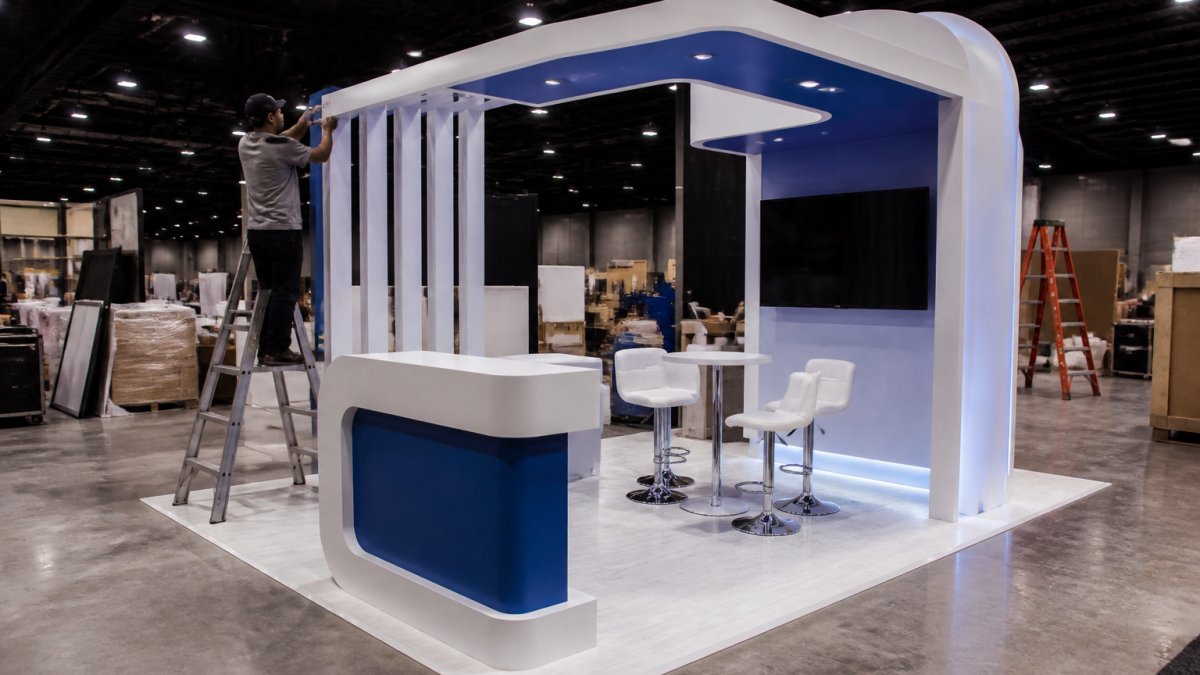
A photorealistic render shows the booth under show-floor lighting, from the aisle view your attendees will actually have. Executives approve faster when they can see it. Sponsors commit faster when they can see where their logo lands.
Pro Tip Ask your fabrication partner for a render from the attendee's eye level, not just the hero angle. The aisle view is what sells the concept internally, because it's the view your team will defend in the approval meeting.
Renderings also protect the schedule. Changes made in the render are cost-effective. Changes made after fabrication incur costs for material, labor, and time.
Reducing Rework and Compressing the Custom Fabrication Project Timeline
Rework is the silent timeline killer in a custom fabrication project timeline. It rarely shows up as one big delay.
3D visualization attacks rework at the source. When the model is accurate, the cut list is accurate. When the cut list is accurate, the CNC runs once. When the CNC runs once, the assembly crew isn't standing around waiting for a replacement part.
Where the time comes out:
Stage | Without a Detailed Model | With a Detailed Model |
Concept approval | Multiple markup rounds | One or two review cycles |
Engineering check | Discovered during build | Caught in the model |
CNC and millwork | Re-cuts and rework | Single accurate run |
Graphics production | Resized after test fit | Sized from the model |
On-site install | Field fixes and delays | Planned assembly sequence |
Fewer surprises at each stage add up. A project can install on schedule, avoiding the need for rushed fixes.
Visualizing Freight, Assembly, and Installation Before Anything Ships
Freight and install are where beautiful designs go to die. A structure that looks elegant in a render can be a nightmare to crate, ship, and assemble in a venue with a narrow dock door and a two-hour load-in window. This is the stage most visualization guides skip entirely, they stop at the pretty picture and never model the loading dock.
So we model the whole physical journey before anything leaves the shop. That means building the crate in 3D, not just the booth.
What we actually model at this stage:
Breakdown into shippable sections. Every large structure gets split into pieces a two-person crew can lift and a standard crate can hold. The model shows where the seams land so they hide behind a graphic or a finished edge instead of cutting across a sightline.
Crate elevations and stacking. The crate interior is designed, not just its outside dimensions. Foam blocking, shelf positions, and how sections stack are determined to ensure pieces arrive safely.
Rigging and lift points. Overhead signs, truss, and suspended elements need engineered pick points. Modeling them confirms the venue's rigging height and the crew's lift plan before the truck rolls.
Drayage path and dock constraints. Advance warehouse versus direct-to-show, dock door height, freight elevator dimensions, and aisle width all get checked against the model. A piece that clears the shop door but not the venue's freight elevator is a problem best identified in the model, rather than on move-in day.
Assembly sequence. The model produces a numbered install order. The crew follows it instead of improvising, which is where most on-site hours get burned.
Who reviews what before ship day:
Role | Reviews |
Designer | Finish, sightlines, graphic placement on assembled model |
Engineer | Rigging points, load paths, connection details |
Production lead | Cut list, hardware, crate layout, assembly order |
Logistics/install lead | Crate weights, drayage path, venue constraints, crew plan |
Client | Final assembled look and the install schedule |
A build-and-ship plan that's been modeled in 3D can lead to:
More efficient on-site hours from the install crew, as the sequence is decided in advance
Reduced risk of a piece arriving damaged, as the crate design is optimized
A clear assembly order the crew can follow
Crate sizes and weights that align with freight quotes, helping to avoid surprise re-class charges
Pro Tip Ask for a crate drawing alongside the booth render. If your fabrication partner can't show you how the piece breaks down and ships, the install plan is a guess.
This is the part that separates a rendering from a buildable plan. Every cool idea eventually has to survive a loading dock. Modeling the crate, the drayage path, and the assembly sequence is how you make sure it does.
Where 3D Visualization Pays Off Most, and Where It Does Not
3D visualization pays off most on complex, custom, deadline-driven builds. It pays off least on simple, repeatable structures that have already been built and refined. But the honest answer is more specific than that, and it includes the ways visualization can quietly hurt a timeline if it's handled badly.
Reach for heavy visualization when:
The design has curves, cantilevers, or unusual geometry that's hard to read in 2D
Multiple teams need to approve the concept, and each one needs to see something different
The install window is tight and the venue has strict rules on rigging, dock access, or load-in hours
The piece needs to ship, break down, and be reused across multiple shows or markets
The build involves mixed materials, millwork, metal, acrylic, fabric, lighting, AV, where fit and tolerance matter
Skip the deep modeling when:
You're reusing a proven booth with known dimensions and an existing crate plan
The structure is a simple flat-wall inline exhibit with no custom geometry
The design is fully locked and already engineered, so there's nothing left to test
Where visualization can backfire, and how to prevent it:
Stale revisions. A model is only as good as its version control. If the shop is cutting from Rev 3 and the client is approving Rev 5, you've built the wrong thing faster. Fix: one model is the master, and every drawing, cut list, and render is generated from it, never edited separately.
Pretty but not buildable. A render can show a seamless curve that no CNC can cut and no seam can hide. Fix: the same person who will build it reviews the model before it's shown to the client.
Data exchange problems. Files move between design software, engineering software, and CNC toolpaths. Translation errors, missing faces, wrong scale, dropped layers, are common. Fix: confirm units and export settings at handoff, and test-nest a critical part before committing material.
Model accuracy drift. A model built for a client presentation may not carry real material thicknesses, hardware clearances, or tolerance. Fix: separate the concept model from the production model, and don't let the concept model drive the cut list.
Over-modeling. Spending days modeling a detail the client will never see, or a part that's a standard off-the-shelf component, adds front-end time without removing any build time.
Watch Out Don't assume 3D visualization fixes a bad timeline. If the design isn't finalized, no model will save the schedule. Visualization speeds up a defined project. It can't rescue an undefined one.
A note on cost and tools: modeling adds front-end work, and the software and labor involved vary by project scope. If you want to know what visualization adds to your specific project, that's a conversation.
Conclusion: Send the Rendering, Get a Buildable Plan
The real test of any design isn't how it looks on a screen. It's whether it can be built, shipped, installed, and afforded on the date that matters. 3D visualization is how you find that out before the sawdust flies.
At Breakthrough Productions, we combine creative strategy with design, engineering, fabrication, logistics, and installation under one roof. Bring us a finished agency rendering, a rough concept, or just an objective, and we'll model it, pressure-test it, and tell you exactly how it builds and ships. Send the rendering over, or tell us what you're trying to accomplish, and we'll work backward from there.
Frequently Asked Questions
What is the difference between a 3D rendering and a fabrication-ready model?
A 3D rendering is a picture meant to sell the concept. A fabrication-ready model carries the information a shop actually builds from: panel dimensions, material thickness, joinery, structural attachment points, and cut paths for CNC and millwork. The rendering wins the approval; the fabrication model prevents the rework. Ask any partner whether the same model that produced your visuals also drives the shop drawings, because when those are two separate files, errors creep in between them.
How early should 3D visualization be included in a fabrication project?
Before the design is locked, not after. When 3D modeling for fabrication starts at the concept stage, buildability problems get caught while changes are still cheap. Once millwork is cut and graphics are printed, a fix costs real money and real days. For a trade show with an immovable move-in date, that early window is usually the only place in the custom fabrication project timeline where you can absorb a change without touching the install schedule.
Can 3D visualization help plan installation and assembly?
Yes, and this is where teams often leave time on the table. A model can be broken into crate-by-crate assemblies so the install crew knows what arrives in which box and the order it goes together. It also reveals what needs a lift, what clears a freight door, and what has to be assembled before it goes vertical. Planning that on screen keeps the on-site crew from improvising under a move-out clock.
Does 3D visualization replace a physical prototype?
It reduces how many you need, but it does not eliminate them. Visualization settles geometry, sightlines, proportions, and finish direction cheaply. A physical mock-up still earns its place for anything people touch, sit on, or walk through, and for finishes where lighting changes everything. The practical approach is to visualize broadly, then prototype narrowly on the two or three details that carry the most risk.
LET'S START SOMETHING AMAZING


Comments